Enterprise Hub-and-Spoke WAN Architecture with SD-WAN, IPsec VPN, and High Availability
Dual-WAN | SD-WAN | IPsec | SSL/TLS | HA Active-Passive
Overview
This lab simulates a production-grade enterprise WAN architecture built inside a virtualized environment. The project covers the full lifecycle of designing, deploying, and troubleshooting a multi-vendor, resilient Hub-and-Spoke network — from IPsec tunnel establishment to dynamic routing and firewall policy enforcement.
The scenario mirrors a real-world enterprise where a headquarters (HQ) site needs to securely interconnect with multiple remote branch offices over the internet, while maintaining continuous uptime, optimized traffic paths, and secure remote access for end users.
Problem
A growing organization with multiple branch locations faces three core challenges:
- Single points of failure: One ISP link at HQ means any outage drops all branch connectivity.
- Unoptimized traffic: Without intelligent path selection, traffic takes the same route regardless of link quality or congestion.
- Insecure remote access: Employees working remotely need authenticated, encrypted access without relying on traditional hardware VPN clients tied to a single gateway.
Standard static routing with a single VPN tunnel per branch cannot address these problems reliably at enterprise scale.
Solution
The architecture was redesigned around three core principles: redundancy, intelligent path selection, and layered security.
- Dual-WAN ISP connections at HQ eliminate the single point of failure at the network edge.
- SD-WAN actively monitors link health and steers traffic to the best-performing WAN path in real time — no manual intervention needed.
- Dual IPsec VTI tunnels per branch ensure that even if one HQ WAN link goes down, the branch VPN stays up via the secondary tunnel automatically.
- FortiGate Active-Passive HA clustering removes the firewall itself as a potential failure point.
- SSL-VPN with client certificates provides secure, identity-verified remote access without relying on pre-shared keys.
This layered approach ensures that no single failure — ISP outage, firewall hardware fault, or tunnel drop — interrupts business connectivity.
Architecture Description
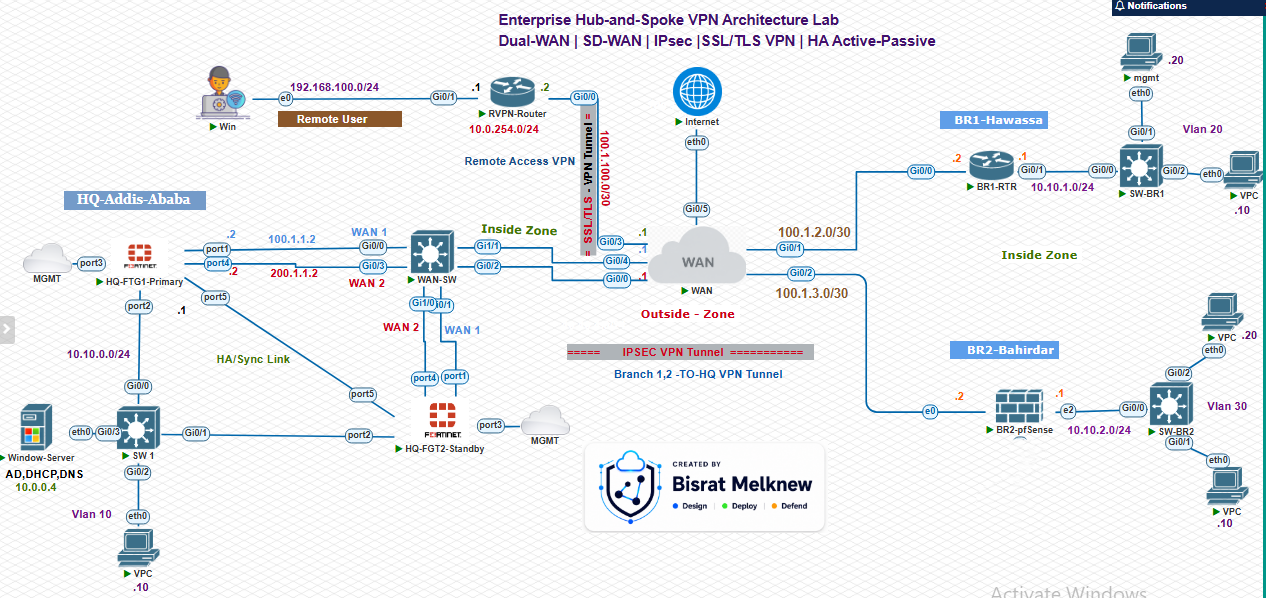
Hub Site (HQ)
The HQ runs a FortiGate Active-Passive HA cluster with two WAN uplinks:
WAN1 (port1)— Primary ISPWAN2 (port4)— Secondary ISP
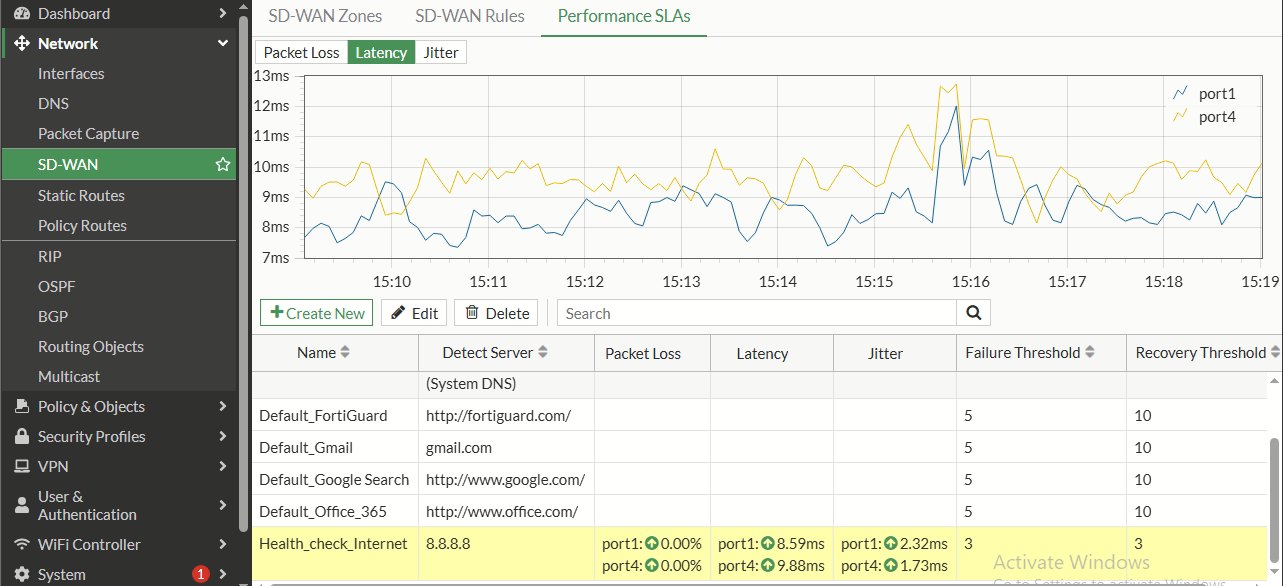
Both interfaces are aggregated into an SD-WAN WAN-ZONE. Performance SLA probes continuously monitor link quality (latency, jitter, packet loss) to 8.8.8.8. SD-WAN steering rules enforce an active-passive policy: all traffic prefers WAN1 and automatically shifts to WAN2 if three consecutive health checks fail — achieving sub-15-second failover.
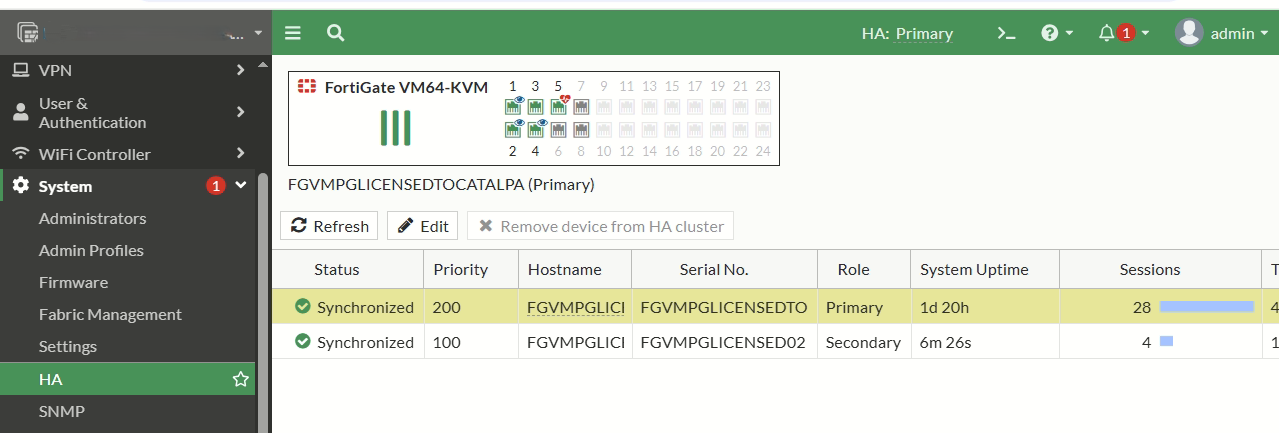
The HA cluster uses Unicast Heartbeat over UDP/4500 on a dedicated sync interface to overcome KVM/Linux bridge limitations that drop standard multicast heartbeat frames (EtherType 0x8890). A Cisco Layer 2 switch segregates WAN1 and WAN2 traffic using VLANs 100 and 200, enabling clean gratuitous ARP and virtual MAC propagation during failover.
Branch Spokes
Two remote branch sites connect to HQ via route-based IPsec VPN (VTI):
- Branch 1 — Cisco IOS Router
- Branch 2 — pfSense with FRR
Each branch establishes two IPsec tunnels: one to HQ WAN1 and one to HQ WAN2. Active-passive path selection between tunnels is controlled by routing metrics — the primary tunnel has a lower Administrative Distance (110) and the backup tunnel uses a higher value (200), ensuring automatic failover with no manual intervention.
Dynamic Routing (OSPF Area 0)
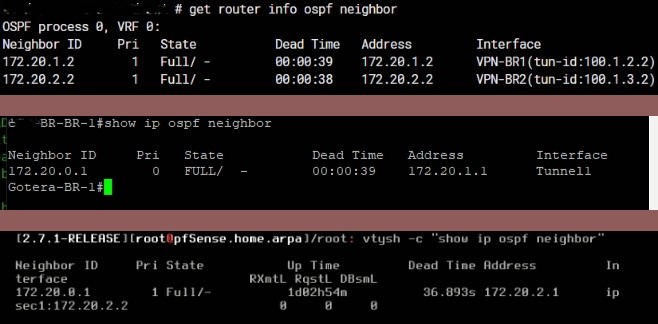
All tunnel interfaces participate in OSPF Area 0 to dynamically advertise and learn branch subnets. LAN and SSL-VPN subnets are configured as passive interfaces to prevent unnecessary OSPF hello flooding while still advertising prefixes into the routing domain.
SSL-VPN Remote Access
Remote users connect via multi-port SSL-VPN listeners on the FortiGate. Authentication uses client certificates issued by an internal Windows Server AD CS CA, eliminating reliance on username/password alone and enforcing mutual TLS authentication.
IP Addressing Table
| Device | Interface | Physical/Logical IP | Destination / Gateway |
|---|---|---|---|
| HQ-FortiGate | port1 (WAN1) | 100.1.1.2/30 | Gateway: 100.1.1.1 (Active) |
port4 (WAN2) | 200.1.1.2/30 | Gateway: 200.1.1.1 (Standby) | |
port2 (HQ LAN) | 10.10.0.1/24 | HQ Internal Subnet | |
| Branch 1 (Cisco) | WAN IP | 100.1.2.2 | Spoke WAN Gateway |
Tunnel1 (VTI-1) | 172.20.1.2/30 | Connects to HQ WAN1 (172.20.1.1) | |
Tunnel2 (VTI-2) | 172.20.11.2/30 | Connects to HQ WAN2 (172.20.11.1) | |
| Branch 2 (pfSense) | WAN IP | 100.1.3.2 | Spoke WAN Gateway |
VTIHQ (VTI-1) | 172.20.2.2/30 | Connects to HQ WAN1 (172.20.2.1) | |
VTIHQW2 (VTI-2) | 172.20.12.2/30 | Connects to HQ WAN2 (172.20.12.1) |
Technologies Used
| Category | Technology |
|---|---|
| Firewalls | FortiGate NGFW (FortiOS 7.0.x), pfSense |
| Routing | OSPF Area 0, Static Routing with AD-based Failover |
| VPN | IKEv2/IPsec (VTI), SSL/TLS VPN |
| SD-WAN | FortiGate SD-WAN with Performance SLA |
| High Availability | FortiGate Active-Passive HA, Unicast Heartbeat |
| PKI | Windows Server AD CS, Client Certificates |
| Spoke Devices | Cisco IOS, pfSense/FRR |
| Layer 2 | Cisco L2 Switch — VLAN 100/200 WAN Segregation |
| Automation | Python (openpyxl) — VPN Design Workbook Generator |
| Lab Platform | PNETLab / Proxmox |
Security Considerations
- All branch-to-hub traffic encrypted with IKEv2/IPsec using
AES-256encryption andSHA-256integrity hashing. - SSL-VPN uses mutual TLS with AD CS client certificates — preventing unauthorized access even if credentials are compromised.
- Explicit bidirectional firewall policies defined for every allowed traffic flow — FortiGate blocks all inter-zone traffic by default.
- NAT explicitly disabled on VPN policies to prevent crypto-map mismatches that would silently drop return traffic.
- LAN-facing and SSL-VPN interfaces set as OSPF passive to suppress hello packets and prevent routing information leakage.
- HA heartbeat and config-sync traffic runs on a dedicated isolated segment, separated from production traffic.
Challenges
| Challenge | Root Cause | Resolution |
|---|---|---|
| OSPF stuck in EXCHANGE state | MTU mismatch across virtual tunnel interfaces | Enabled mtu-ignore on all platforms (FortiGate, Cisco, pfSense) |
| HA heartbeat dropping | KVM bridges dropping raw EtherType 0x8890 frames | Switched to Unicast Heartbeat (UDP/4500) with link-local IPs |
| VTI routing table empty | Missing set net-device enable on Phase 1 configuration | Enabled net-device on all VTI Phase 1 interfaces |
| SSL-VPN certificate validation failing | Incomplete CA trust chain on FortiGate | Imported both Root CA and Issuing CA certificates |
Results
- ✅ Zero single points of failure across ISP, VPN tunnels, and firewall layers
- ✅ Sub-15-second WAN failover — automatic, no manual intervention required
- ✅ Multi-vendor OSPF adjacency stable across FortiGate, Cisco IOS, and pfSense/FRR
- ✅ Certificate-based SSL-VPN operational and ready for enterprise deployment
- ✅ Automated VPN planning workbook reduces human error in spoke deployment planning
Lessons Learned
-
Platform behavior matters as much as protocol knowledge — knowing OSPF theory is not enough; you must understand how each vendor's implementation handles MTU, neighbor timeouts, and passive interface behavior.
-
Virtualized environments introduce hidden constraints — KVM bridges, Linux networking stacks, and virtual NICs impose limitations (like EtherType filtering) that do not exist in physical environments. Lab engineers must account for these.
-
Firewall-first thinking is mandatory with FortiGate — unlike traditional routers, FortiGate requires an explicit firewall policy for every traffic flow. Missing a policy causes silent traffic drops that can look like routing failures during troubleshooting.
-
Document as you build — capturing configurations, design decisions, and troubleshooting steps in real time creates reusable institutional knowledge and significantly reduces resolution time for future incidents.
-
Design workbooks save time at scale — formalizing the VPN design process in a validated spreadsheet template reflects production-grade engineering discipline and is directly transferable to real enterprise deployment workflows.